Prepare
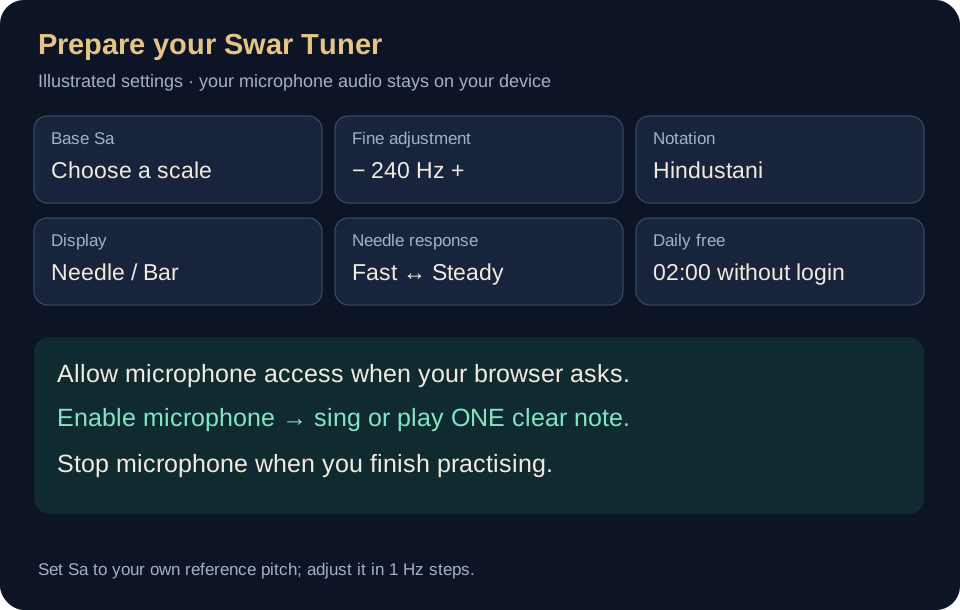
Choose your reference Sa and notation.

Set your reference Sa, allow the microphone, and use the meter to bring one clear note into tune. This guide follows the current website tuner.
Choose your reference Sa and notation.
Enable the microphone and sing or play one note.
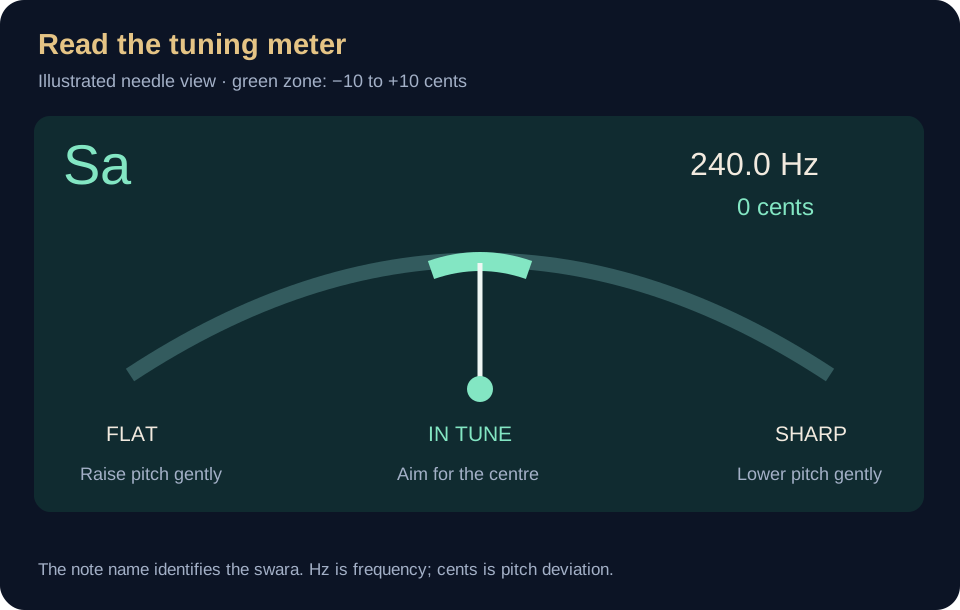
Use the centre of the meter and pitch history to steady the note.
| Control | How to use it |
|---|---|
| Flat / left / negative cents | Your note is below the target pitch. Raise it gently and watch the needle move towards the centre. |
| Centre / green | The pitch is near the target. Aim for a calm, steady needle rather than forcing it to stay perfectly still. |
| Sharp / right / positive cents | Your note is above the target pitch. Lower it gently. |
| Hz | The detected frequency of the sound. The selected Sa frequency is your reference, not a microphone sensitivity setting. |
| Pitch history | The history shows roughly the last six seconds. A steadier line helps you see how consistently you held the note. |
| Needle / Bar meter | Choose the display that you find easiest to read. Both reflect the same pitch measurement. |
| Needle response | Move towards Fast to follow pitch changes more quickly, or Steady to smooth the display. This changes visual smoothing, not your microphone hardware delay. |
Set your reference, enable the microphone and sustain Sa for a few comfortable seconds. Watch whether the pitch settles near the green centre. Relax before repeating.
Move to another swara slowly. Wait for a clear reading before adjusting. Let the meter support your listening instead of trying to chase every small movement.
Hold one comfortable note while watching the history line. Notice any rise or fall across the breath and make gentle changes.
Use the same reference Sa throughout a session so your note labels remain consistent. Stop the microphone when you are done.
The web tuner includes two free minutes of active microphone use each day on your browser. It resets at midnight, India time. Stopping the microphone stops that usage timer.
Open Account & purchase and sign in with Google or a verified email. Choose Buy access · ₹100 once to open secure Razorpay checkout. A confirmed purchase gives access with no expiry and no automatic renewal.
If confirmation is pending, refresh payment status; do not pay again. Current paid access is kept. If an older annual mandate is still retrying, cancel its future renewals before starting a one-time purchase.
On iPhone/iPad, open in Safari and choose Share → Add to Home Screen. Supported Android and desktop browsers can also install the web app. Open it online first to cache its app files.
Internet is required for sign-in, payment and checking your purchase when opening. Once loaded and verified, pitch processing takes place on your device. Microphone permission is still needed.
Some browsers stop microphone access when the page is hidden or the phone locks. Keep the tuner visible while practising. The Android download may arrange controls differently from this web guide.
Check microphone permission, select Enable microphone and play one clear note near the device. Check that another app is not holding the microphone. Open the page directly in an up-to-date browser rather than a messaging app’s embedded browser.
Try a quieter room and a steadier single note. Move Needle response towards Steady for a smoother display. Make sure your selected Sa matches the intended reference.
Check the selected notation and Base Sa. Hindustani and Carnatic names are relative to Sa; changing the reference can change the detected swara label.
The website stops its microphone processing when the page is hidden. Keep it visible to tune, and use Stop microphone when finished.
The current website is focused on tuning. The Phrase tab has been removed.
Sign in with the same verified email linked to your purchase, then refresh payment status. If the bank payment is still pending, wait for confirmation and avoid paying a second time.
Open the app and take your first small step.